In an office dominated by wired desk phones, the Maxwell C is one of a kind. This is Gigaset’s most advanced professional cordless phone in a Maxwell housing.
The wireless office of today has shed the need for physical network connections. Our computers and office phones are all cordless – and the Gigaset Maxwell C leaves you with supreme flexibility from the desk.
All devices can now be connected to DECT single N510 or Multicell system from Gigaset. This brings the ideal IP phone solution with extraordinary HD-audio, crystal clear TFT-display delivering an intuitive business companion to the front of the wireless office.
The Maxwell C’s stylish design and flexible mounting options make it the perfect phone for anything from the office to the home; the hospitality environment to the warehouse and the garage.
Ready for use with all Gigaset’s professional base stations including Multicell systems to deliver complete coverage from any desk, meeting-room or office environment.
Email or Call for current pricing and qty discounts
Zulu UC Desktop and softphone integration unifies the most popular business communication tools & applications enhancing user productivity and mobility. Designed specifically for FreePBX and PBXact phone systems, Zulu enables features such as:
Zulu Softphone enabling users to make/receive phone calls from their desktop or mobile stations, including Chat for team collaboration.
Faxing directly from the Zulu widget & softphone.
Click-to-call to make calls directly from your web browser and /or email client.
With Click-to-Call integration, users can instantly call any phone number that is seen on their web browser or MS Outlook client which a click!. Simply click on the phone number and Zulu will initiate an outbound call via the softphone client or your desk phone, whichever is with you at the time. Great for mobile users who come and go from their workstation.
Click-to-Call also recognizes extensions and phone number prefixes, so you never have to worry about having to modify the phone number or extension you wish to click to dial.
Call Pop
Ideal for CRM and Help Desk Integration, Call Pop will automatically open your desktop web browser on an inbound call with all the information of the caller. This feature helps users expedite phone calls and provide the caller with the best customer service experience.
* For additional CRM integration check out our CRM Link Module
Presence
Improve communication between staff members by allowing them to see each other’s presence via the Zulu Softphone. This feature can save your employees time by reaching out to members who they know are available to take their request.
Users can set their presence using a variety of pre-set statuses or create their own. And because Presence is server side, a user’s presence will be updated across all communication endpoints automatically too.
Zulu Softphone
At the Center of the Zulu is the all new softphone enabling users to take their office with them and never miss a call.
Make and receive phone calls using Desktop
Send and receive FAX*
Control Presence status which will update your status on all your devices
Flexible Calling Options- generate a phone call from either the client on your desktop or your desk phone. Great for mobile users who come and go from their workstation.
The Zulu UC Softphone features integrated Chat functionality so that staff members can communicate with each other more effectively. Features like 1-to-1 messaging, group chat, file transfer and auto-archiving will improve employee collaboration and improve business results. Finally, one tool to do it all!
*Compatibility
Operating System: Zulu UC is compatible with Windows, Mac and Linux operating Systems. Browsers: Click-to-call and Screen POP work with Firefox and Chrome (Safari coming soon).
The Most Resilient VoIP Digital Gateways in Their Class
Vega VoIP digital gateways are small appliances that seamlessly connect your legacy telephony infrastructure, made up of PRI (T1, E1) or BRI lines, to IP networks. They are great for businesses with legacy phone equipment (such as a TDM PBX) who want to connect to SIP trunking services without having to spend money altering their current network infrastructure. They are also great for businesses that are already VoIP enabled at the core (with an IP-PBX) that need PSTN connectivity and require a SIP-to-TDM converter. Simply place the Vega VoIP Digital Gateway at the edge of your network, plug in your existing internet cable for VoIP connectivity and E1,T1 or BRI cables from your phone system and let the Vega VoIP Digital Gateway automatically handle the SIP signalling and voice media conversion for seamless voice and T.38 Fax integration.
Advanced Web GUI
Features an intuitive Quick Wizard which does all the hard work for you for new deployments. Flexible dialplan to allow you to make your own routes, including automatic failure detection with failover routing.
Diagnostic Tools
Web GUI based PCAP tracing tool to capture full signaling and media, eliminating the need to connect equipment for line tracing, fully compatible with wireshark.
Low and High Density Models
The Vega 100G and Vega 200G are our low density models with a maximum capacity for 30 and 60 SIP-TDM simultaneous calls. The Vega 400G is our high density model and the most flexible field upgradable unit for a maximum capacity of 120 simultaneous SIP-TDM calls.
E1/T1 & BRI Interface
Each E1/T1 interface (for Vega 100G, 200G, 400G) and BRI interface (Vega 50 BRI) can be independently configured as network side or terminal side. The Vega gateway can therefore be connected to a PBX or the PSTN.
Built-in Local Survivability
In the event of a WAN failure, IP phones behind the Vega gateway can continue to call each other, be routed to a backup switch or connected directly to the PSTN.
Vega VoIP Digital Gateway Models
Vega VoIP Digital Gateways are one of the most reliable fault tolerant SIP-to-TDM media Gateways on the market, sized for your business needs. All Sangoma hardware carries a one year warranty with options to extend.
Vega 50 BRI
Sangoma’s Vega 50 BRI VoIP Digital Gateways are a 2-4-8 port BRI appliance for up to 16 simultaneous BRI calls
Web GUI for configuration and troubleshooting
Featuring Quick Wizard for rapid d
eployment
Onboard DSP for media translation
Interoperable with most legacy and VoIP carriers worldwide
Advanced flexible call routing with automatic failover and bypass routing
Built in Local Suitability in the case of WAN failure
Vega 100G
Sangoma’s Vega 100G VoIP Digital Gateways are a single port T1/E1/PRI appliance supporting up to 30 simultaneous calls.
Web GUI for configuration and troubleshooting
Featuring Quick Wizard for rapid deployment
Onboard DSP for media translation
Interoperable with most legacy and VoIP carriers worldwide
Advanced flexible call routing with automatic failover and bypass routing
Built in Local Suitability in the case of WAN failure
Vega 200G
Sangoma’s Vega 200G VoIP Digital Gateways are a dual port T1/E1/PRI appliance supporting up to 60 simultaneous calls.
Web GUI for configuration and troubleshooting
Featuring Quick Wizard for rapid deployment
Onboard DSP for media translation
Interoperable with most legacy and VoIP carriers worldwide
Advanced flexible call routing with automatic failover and bypass routing
Built in Local Suitability in the case of WAN failure
Vega 400G
Sangoma’s Vega 400G VoIP Digital Gateways are a quad port T1/E1/PRI supporting up to 120 simultaneous calls.
Web GUI for configuration and troubleshooting
Field upgradable licensing
Dedicated bypass ports for High availability
Support for Private Wire or Point-to-Point applications
Onboard DSP for media translation
Interoperable with most legacy and VoIP carriers worldwide
Advanced flexible call routing with automatic failover and bypass routing
2N offer a range of stylish solutions for door communication. The 2N® Helios IP door and security intercoms will ensure comfort for you and your visitors and with a range of different models and feature enhancing accessories there will be an option to suit your needs.
Due to the complexity and multiple configurations possible please call or email for pricing and options.
As of January 1, 2017 the patent terms of most Licensed Patents under the G.729 Consortium have expired.
With regard to the unexpired Licensed Copyrights and Licensed Patents of the G.729 Consortium Patent License Agreement, the Licensors of the G.729 Consortium, namely Orange SA, Nippon Telegraph and Telephone Corporation and Université de Sherbrooke (“Licensors”) have agreed to license the same under the existing terms on a royalty-free basis starting January 1, 2017.
For current Licensees of the G.729 Consortium Patent License Agreement, no reports and no payments will be due for Licensed Products Sold or otherwise distributed as of January 1, 2017.
For other companies selling G.729 compliant products and that are not current Licensees of the G.729 Consortium, there is no need to execute a G.729 Consortium Patent License Agreement since Licensors have agreed to license the unexpired Licensed Copyrights and Licensed Patents of the G.729 Consortium Patent License Agreement under the existing terms on a royalty-free basis starting January 1, 2017.
As soon as we hear how this is going to affect Digium Asterisk we will update here.
Leo D’Alessandro, Product Marketing Manager at Sangoma, and Frederic Dickey, VP of Product Management at Sangoma, will in this webinar explain how to build an efficient contact center cost-effectively with Sangoma’s FreePBX / PBXact UC.
In this webinar, you’ll learn how the many ways FreePBX / PBXact UC can solve your contact center requirements:
• How calls are best routed using call queues
• Maximizing Agent Productivity and Customer Satisfaction with automated Queue Callbacks
• Integration with desktop and CRM
• Monitoring live call metrics
• Reporting tools to analyze overall performance
Introducing the FreePBX appliance! The FreePBX appliance is a purpose-built, high-performance PBX solution. Designed and rigorously tested for optimal performance, this is the only officially supported hardware solution for FreePBX. The appliance comes preloaded with the FreePBX Distro and includes a one-year warranty!
Featuring the FreePBX Distro, this appliance is an ideal fit for businesses looking to get more from a PBX. With millions of deployments throughout the world, FreePBX is relied upon daily by everyone from enterprises to startups. Leveraging the power of FreePBX has enabled businesses to grow while keeping communication expenses minimal. The FreePBX Distro has made deploying, configuring and using a PBX system easier than ever! With an easy-to-use GUI (Graphical User Interface), getting started is a breeze!
With over 1 MILLION production systems worldwide and 20,000 new systems installed monthly, the FreePBX community continues to out-perform the industry’s commercial efforts. The FreePBX EcoSystem has developed over the past decade to be the most widely deployed open source PBX platform in use across the world. The openness of the project allows users, resellers, enthusiasts and Partners to utilize the FreePBX EcoSystem to build robust communications solutions that are powerful but at the same time easy to implement and support. Sangoma is proud to be the sponsor of FreePBX project. If you are new to FreePBX you can get started quickly by downloading and installing the FreePBX Distro. The FreePBX Distro is an all in one platform that installs everything you need to build a phone system. Once You have a basic PBX in place you can add commercial modules to add advanced features to an already feature rich base install of FreePBX.
As an open source GPL, web-based PBX solution, FreePBX is easy to customize and adapt to your changing needs. FreePBX can run in the cloud or on-site, and is currently being used to manage communications of all sizes and types of environments from small one person SOHO (Small Home, Small Office) businesses, to multi-location corporations and call centers. The FreePBX ecosystem provides you with the freedom and flexibility to custom design business communications around your needs.
FreePBX Commercial Modules are add-ons that enhance the already feature rich base install of FreePBX! These modules are not Open Source GPL and are only designed to work with CentOS or RHEL systems. The FreePBX Distro is already preconfigured to work with these modules. For custom installations please see: Install Commercial Modules on CentOS and RHEL based systems
The FreePBX appliance is a purpose-built, high-performance PBX solution. Designed and rigorously tested for optimal performance, this is the only officially supported hardware solution for FreePBX. The appliance comes preloaded with the FreePBX Distro and includes a one-year warranty!
Featuring the FreePBX Distro, this appliance is an ideal fit for businesses looking to get more from a PBX. With millions of deployments throughout the world, FreePBX is relied upon daily by everyone from enterprises to startups. Leveraging the power of FreePBX has enabled businesses to grow while keeping communication expenses minimal. The FreePBX Distro has made deploying, configuring and using a PBX system easier than ever! With an easy-to-use GUI (Graphical User Interface), getting started is a breeze!
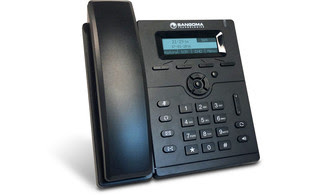
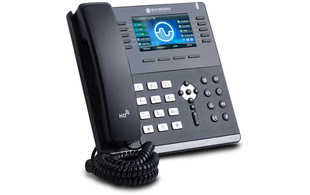
Sangoma IP Phones Designed Exclusively for FreePBX are Designed to work with FreePBX, Sangoma IP phones are so smart you can quickly and easily use them right out of the box. Each phone in the series features industry standard Power over Ethernet, so no power cable or outlets required. They have full duplex speakerphones, dual Ethernet Ports, multi-way conference calling, high definition voice quality, and they’re Virtual Private Network (VPN) capable.
Full Integration with FreePBX, FreePBX phone apps are available right on the phone, straight out of the box with no requirement for additional licenses. Users can control complicated features directly from their phones. There’s no need to remember feature codes. User applications include: Call Parking, Follow Me, Do Not Disturb, Conference Rooms, Call Forwarding, Time Conditions, Presence, Queues, Transfer to Voice Mail, Visual Voice Mail, and Log in/out.
Why is Sangoma Zero Touch Better? VoIP telephones can be complex to install, and manually configuring many different parameters and hundreds of extensions can take hours. When you buy and install your Sangoma IP phones, the redirection server automatically points the phone to the Sangoma FreePBX for configuration. Other vendors have redirection servers, but they have to be programmed with the details of the IP PBX. Only Sangoma can provide Zero Touch provisioning with FreePBX.
EndPoint Manager Included When using a Sangoma phone, EndPoint Manager software inside FreePBX is automatically enabled. This lets your users control global settings, program their phone keys, map extensions, upload images, download new firmware, and much more.
Zulu UC is a unified communications desktop program that interfaces with FreePBX and PBXact. It provides call notifications, SMS, faxing capabilities and much more! Supported applications include Microsoft Outlook, Mozilla Firefox and Google Chrome.
User connections are available in 20-seat packages, so get yours today by visiting the Store tab in your FreePBX Portal!
Click to Call
Zulu UC enables you to click-to-call within email, contact lists and websites. The Click to Call feature is currently supported for Microsoft Outlook 2010 or newer, Google Mozilla Firefox and Google Chrome.
URL Pop
Call pop settings allow you to have the PBX inform Zulu to open a web browser on a per inbound route or queue level in your PBX GUI. This is ideal integration for CRM and Help Desk systems.
Faxing
If you have the Fax Pro module and Faxing enabled, you can send faxes from both Outlook and the Zulu UC Widget in addition to UCP. You can also view received faxes the same way you view emails under your Outlook Inbox, where you then save the attached fax wherever you’d like.
Browser Plug-ins
Zulu UC is currently supported for Mozilla Firefox and Google Chrome on Windows machines. Make sure to install the Zulu Firefox Plugin or the Zulu Chrome Plugin before you start using Zulu UC in your browser. Support for Mac OSX is coming soon.

 All devices can now be connected to DECT single N510 or Multicell system from Gigaset. This brings the ideal IP phone solution with extraordinary HD-audio, crystal clear TFT-display delivering an intuitive business companion to the front of the wireless office.
 Sangoma’s Vega 50 BRI VoIP Digital Gateways are a 2-4-8 port BRI appliance for up to 16 simultaneous BRI calls
 Sangoma’s Vega 100G VoIP Digital Gateways are a single port T1/E1/PRI appliance supporting up to 30 simultaneous calls.
 Sangoma’s Vega 400G VoIP Digital Gateways are a quad port T1/E1/PRI supporting up to 120 simultaneous calls.


 er of FreePBX has enabled businesses to grow while keeping communication expenses minimal. The FreePBX Distro has made deploying, configuring and using a PBX system easier than ever! With an easy-to-use GUI (Graphical User Interface), getting started is a breeze!

